

Construct a graph
The GNN learns over a Graph — the same Graph class used by graph reasoning, reused here as the structural backbone of the predictive workflow. You declare the graph once, populate its edges from your concepts, and pass it to the GNN constructor so the GNN can train on it.
For predictive use, construct the graph with these flags:
directed=True— either value works, but we usedirected=Truethroughout these guides.weighted=False— per-edge weights aren’t supported in the predictive workflow.
from relationalai.semantics.reasoners.graph import Graph
gnn_graph = Graph(model, directed=True, weighted=False)Edge = gnn_graph.Edge
Edge is the built-in edge concept on the graph; the rest of this page populates it with Edge.new(src=..., dst=...).where(...) calls.
Create a basic graph
Section titled “Create a basic graph”In the simplest case, every connection in your domain becomes a generic gnn_graph.Edge. The where clause matches a foreign key on one concept to the primary key of another — the same join condition you’d write in SQL.
The example below uses three concepts: Customer (the people making purchases), Product (the items being sold), and Transaction (each row records one purchase, linking a customer to the product they bought).
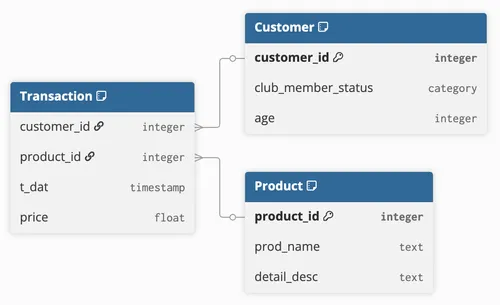
# Each Transaction connects a Customer and a Product.define(Edge.new(src=Transaction, dst=Customer)).where( Transaction.customer_id == Customer.customer_id)define(Edge.new(src=Transaction, dst=Product)).where( Transaction.product_id == Product.product_id)After these define calls, the graph has one node per row of Customer, Product, and Transaction, with edges connecting each transaction to the customer and product it references.
Use multiple edge types between two concepts
Section titled “Use multiple edge types between two concepts”When the same pair of concepts is connected by different kinds of relationship, you typically want the GNN to learn separate message-passing parameters for each — the signal carried by a “buyer” link from a transaction to a customer is different from the signal carried by a “shipped to” link, and treating both as the same edge type blurs that distinction. To keep them separate, define edge subtypes by extending the built-in Edge concept:
ShipmentEdge = Concept("ShipmentEdge", extends=[Edge])Each define(Subtype.new(...)) call adds edges of that subtype; calls to Edge.new(...) continue to add edges of the default (generic) type. Together, you get distinct edge types between the same concept pair — for example, a Transaction that links to one Customer as the buyer and (possibly) a different Customer as the shipment recipient.
The example below extends the basic schema by giving Transaction a second foreign key into Customer: customer_id is the buyer (who paid) and shipped_to_id is the recipient (who received the package). A gift purchase, for instance, has different values in those two columns.
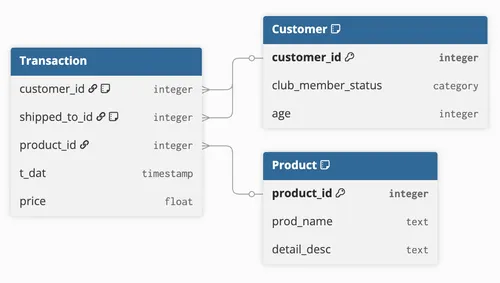
# Generic edge: a Transaction was made by a Customer (the buyer).define(Edge.new(src=Transaction, dst=Customer)).where(    Transaction.customer_id == Customer.customer_id)
# Subtyped edge: a Transaction was shipped to a Customer (the recipient,# who may differ from the buyer — for example, a gift purchase).define(ShipmentEdge.new(src=Transaction, dst=Customer)).where(    Transaction.shipped_to_id == Customer.customer_id)
# Rest of edges with different source and destination concepts.define(Edge.new(src=Transaction, dst=Product)).where(    Transaction.product_id == Product.product_id)
The GNN will learn distinct message-passing parameters for Edge and ShipmentEdge, so it can model how each kind of relationship influences the prediction.
Use self-referential edges
Section titled “Use self-referential edges”When the source and destination of an edge are the same concept, you can’t write Edge.new(src=Posts, dst=Posts) directly — both endpoints would refer to the same instance, not two different ones. Use Concept.ref() to create a reference to a second instance of the same concept.
The example below uses a Posts concept — forum posts where some are replies to others. Each row has its own id and an optional parent_id pointing back at another post in the same table (the post it replies to):
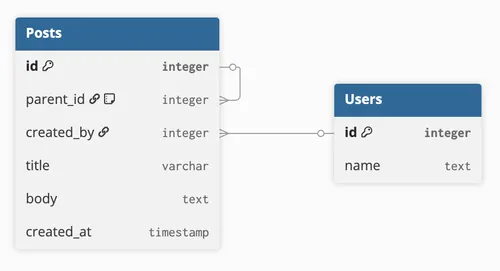
PostsRef = Posts.ref()
# Self-referential edgedefine(Edge.new(src=Posts, dst=PostsRef)).where(    PostsRef.parent_id == Posts.id)
define(Edge.new(src=Posts, dst=Users)).where(    Posts.created_by == Users.id)
PostsRef is bound by the where clause to a different Posts instance — here, the post whose parent_id matches the source post’s id.
The same pattern works when the relationship is mediated by a third concept rather than expressed as a column on the concept itself. The example below uses a People concept (individuals) and a Related concept that acts as a bridge: each row of Related pairs two people together via the person1 and person2 foreign keys, both of which point into People.
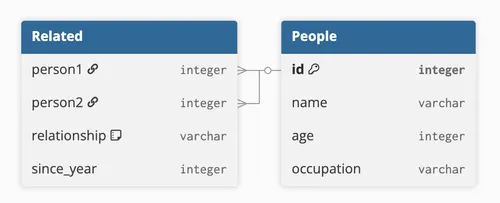
PeopleRef = People.ref()
define(Edge.new(src=People, dst=PeopleRef)).where(    People.id == Related.person1,    PeopleRef.id == Related.person2,)
In both cases, Concept.ref() introduces a second slot for the same concept so the where clause can distinguish the two endpoints.
Pass the graph to the GNN
Section titled “Pass the graph to the GNN”Once your graph is populated, pass it to the GNN constructor via the graph argument:
gnn = GNN( ..., graph=gnn_graph,)The same graph can be reused across multiple GNN instances — for example, when training with different task splits or hyperparameters — as long as the concepts and edges remain consistent.