

Define a learning task
A learning task tells the GNN what you want it to predict, what labeled data to learn from, and (for temporal tasks) the temporal context to preserve. Predictive reasoning supports two task families:
- Node tasks — predict something about an entity. The model produces a label or a numeric value for each instance of a source concept. Use a node task when the answer is a property of one entity (for example, “will this customer churn?”, “what category does this product belong to?”, “what will this store’s weekly sales be?”).
- Link tasks — predict connections between entities. The model scores candidate pairs and returns, for each source, the top-k destinations it expects to be connected to. Use a link task when the answer is a relationship between two entities (for example, “which products is this customer likely to purchase?”).
Within each family, you can pick a more specific variant via the task_type argument on the GNN constructor — covering binary, multiclass, and multilabel classification, regression, and link prediction. The family itself is implicit in how you build the train, validation, and test sets:
- For a node task, each row in train, validation, and test set maps a single entity to a label or a numeric target. The
fragmentjoins your split table to one source concept. - For a link task, each row in train, validation, and test set pairs a source entity with a target entity. The
fragmentjoins your split table to two concepts.
Choose a task type
Section titled “Choose a task type”Six task types are supported. Each one comes with a default evaluation metric.
task_type | Family | Description | Default metric |
|---|---|---|---|
binary_classification | Node task | There are exactly two possible label classes, and each instance is assigned exactly one label. | roc_auc |
multiclass_classification | Node task | There are more than two possible label classes, and each instance is assigned exactly one label. | macro_f1 |
multilabel_classification | Node task | There are more than two possible label classes, and each instance may be assigned one or more labels. The split table should contain a separate row per (instance, label) pair. | multilabel_auroc_macro |
regression | Node task | The label column is a float or an integer. | rmse |
link_prediction | Link task | Identify the top-k most similar destinations for each source. Each split row represents a single (source, target) pair. | link_prediction_map@12 |
repeated_link_prediction | Link task | A variation of link prediction that identifies destinations a source has visited before and is likely to visit again. Same row shape as link_prediction. | link_prediction_map@12 |
Choose an evaluation metric
Section titled “Choose an evaluation metric”You can override the default metric by passing the eval_metric argument to the GNN constructor. Supported metrics vary by task type; the table below lists the available options. The metric is given as a string in the format name or name@eval_at_k, where eval_at_k is the number of top predictions to consider — applicable only to link prediction tasks.
| Metric Name | Task | Documentation Link |
|---|---|---|
average_precision | binary_classification | link |
accuracy | binary_classification or multiclass_classification | link |
f1 | binary_classification | link |
roc_auc | binary_classification | link |
precision | binary_classification | link |
recall | binary_classification | link |
multilabel_auprc_micro | multilabel_classification | link |
multilabel_auroc_micro | multilabel_classification | link |
multilabel_precision_micro | multilabel_classification | link |
multilabel_auprc_macro | multilabel_classification | link |
multilabel_auroc_macro | multilabel_classification | link |
multilabel_precision_macro | multilabel_classification | link |
macro_f1 | multiclass_classification | link |
micro_f1 | multiclass_classification | link |
r2 | regression | link |
mae | regression | link |
rmse | regression | link |
mape | regression | link |
link_prediction_precision | link_prediction or repeated_link_prediction | link |
link_prediction_recall | link_prediction or repeated_link_prediction | link |
link_prediction_map | link_prediction or repeated_link_prediction | link |
Configure a temporal task
Section titled “Configure a temporal task”When defining a task, you can mark one of the dataset’s columns as a time column. Time columns are essential for temporal tasks, ensuring that the model respects the chronological order of events and prevents from information leakage.
To understand the role of time columns, consider a forecasting example. Suppose you want to train a model to predict the sales of a store on a given date. A sample task table for this regression task might look like:
| STORE_ID | DATE | SALES | PROMO_ACTIVE |
|---|---|---|---|
| 123 | 10/12/2022 | 500 | 0 |
| 123 | 11/12/2022 | 600 | 1 |
| 456 | 10/12/2022 | 500 | 0 |
| 456 | 11/12/2022 | 500 | 1 |
This table contains sales data for two stores over two days. When training a forecasting model, where the task is to predict the value for SALES, it’s critical that the model only has access to data from dates prior to the one it is predicting; otherwise, future information leaks into training and the model overfits.
By marking a column (e.g., DATE) as a time column, the predictive reasoner enforces this temporal constraint. Depending on how the task is configured, it will use data:
- strictly before the prediction date (
<), or - up to and including the prediction date (
<=).
The choice between < and <= is controlled by the use_current_time argument on the GNN constructor:
use_current_time=False→ use<(data strictly before the prediction date).use_current_time=True→ use<=(data up to and including the prediction date).
Suppose you’re predicting product sales at multiple stores on 2022-11-12. Two scenarios shape this choice:
Forecasting (strictly past data). You want to simulate real forecasting conditions, where future or same-day information (such as promotions running today) is not yet known. Set use_current_time=False so the model only uses data before 2022-11-12. This ensures there’s no leakage and mimics how you’d forecast in production using only historical data.
Simulation or “what-if” analysis (include current day). You’re estimating how well your model fits current conditions — you already know that the promotion is active today and you want to use that information. Set use_current_time=True so the model can use all data up to and including 2022-11-12, making features like PROMO_ACTIVE on that day available. This setting is useful when your task represents real-time inference rather than pure forecasting.
Define a temporal node task
Section titled “Define a temporal node task”Consider a customer-churn task. Given a customer and a date, you want to predict whether the customer will stop purchasing in the next month. We treat this as a binary classification task. The split tables TRAIN, VALIDATION, and TEST each carry a customer_id, a timestamp, and a binary churn label (for train and validation).
The dataset has three core concepts:
Customerwith primary keycustomer_idProductwith primary keyproduct_idTransactionwith foreign keys toCustomerandProduct, plus a time columnt_dat
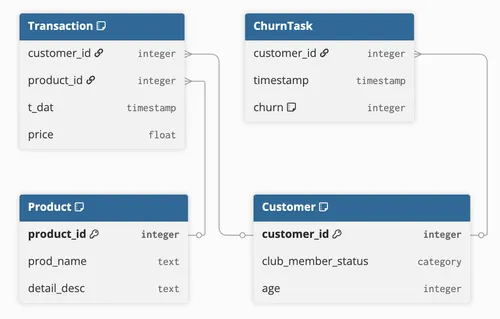
Since you’re predicting churn for customers, the source concept is Customer. Load each split table as a concept, then build a Relationship per split that pairs each Customer with a (timestamp, churn) tuple. The at keyword in the relationship signature tells PyRel that the second slot is a temporal coordinate:
from relationalai.semantics import Any
# Load the labeled split tables as conceptsTrainTable = Concept("TrainTable")ValidationTable = Concept("ValidationTable")TestTable = Concept("TestTable")
define(TrainTable.new(Table("<DATABASE>.<SCHEMA>.TRAIN").to_schema()))define(ValidationTable.new(Table("<DATABASE>.<SCHEMA>.VALIDATION").to_schema()))define(TestTable.new(Table("<DATABASE>.<SCHEMA>.TEST").to_schema()))
# Pair each Customer with a (timestamp, churn) per split.# The `at` keyword marks the second slot as the temporal coordinate.Train = Relationship(f"{Customer} at {Any:timestamp} has {Any:churn}")define(Train(Customer, TrainTable.timestamp, TrainTable.churn)).where(    Customer.customer_id == TrainTable.customer_id)
Validation = Relationship(f"{Customer} at {Any:timestamp} has {Any:churn}")define(Validation(Customer, ValidationTable.timestamp, ValidationTable.churn)).where(    Customer.customer_id == ValidationTable.customer_id)
# The Test relationship omits the label, since it's held outTest = Relationship(f"{Customer} at {Any:timestamp}")define(Test(Customer, TestTable.timestamp)).where(    Customer.customer_id == TestTable.customer_id)
When you train, pass these relationships to GNN(...) along with has_time_column=True so the trainer knows the splits are temporally indexed.
gnn = GNN( exp_database="EXPERIMENTS_DB", exp_schema="MODEL_REGISTRY", graph=gnn_graph, property_transformer=pt, train=Train, validation=Validation, task_type="binary_classification", eval_metric="accuracy", has_time_column=True,)gnn.fit()The GNN infers the source concept from the first slot of Train — Customer here — and produces one prediction per Customer instance. Customer must be part of gnn_graph.
Define a temporal link task
Section titled “Define a temporal link task”Now consider a recommendation task on the same dataset. Given a customer and a date, you want to recommend products the customer is likely to repurchase. Each row of the split table represents a single (customer, product) pair, plus the timestamp at which the link should be predicted.
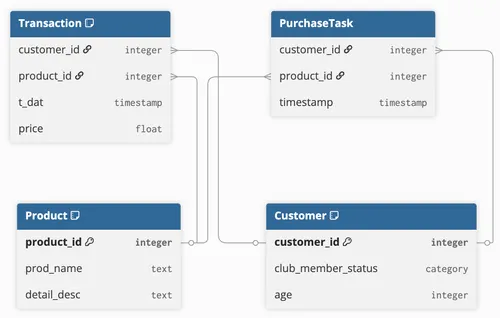
For a link task, the source is Customer and the target is Product. Load the split tables as concepts, then build a select fragment per split that maps each row to a (Customer, timestamp, Product) tuple:
# Load the labeled split tables as conceptstrain_table_concept = Concept("TrainTable")validation_table_concept = Concept("ValidationTable")
define(train_table_concept.new(Table("<DATABASE>.<SCHEMA>.TRAIN_LINK").to_schema()))define(validation_table_concept.new(Table("<DATABASE>.<SCHEMA>.VALIDATION_LINK").to_schema()))
# Each row pairs a (Customer, Product) with a timestampTrain = select(Customer, train_table_concept.timestamp, Product).where(    Customer.customer_id == train_table_concept.customer_id,    Product.product_id == train_table_concept.product_id,)
Validation = select(Customer, validation_table_concept.timestamp, Product).where(    Customer.customer_id == validation_table_concept.customer_id,    Product.product_id == validation_table_concept.product_id,)
Then train the GNN as a (repeated) link prediction task:
gnn = GNN( exp_database="EXPERIMENTS_DB", exp_schema="MODEL_REGISTRY", graph=gnn_graph, property_transformer=pt, train=Train, validation=Validation, task_type="repeated_link_prediction", eval_metric="link_prediction_precision@5", has_time_column=True,)gnn.fit()For link tasks, the GNN infers two concepts from Train: the source (first slot, Customer) and the target (last slot, Product). It then produces a top-k ranking of Product candidates for each Customer. Both Customer and Product must be part of gnn_graph.
Choose between Relationship and select
Section titled “Choose between Relationship and select”Both Relationship and select can build the train, validation, and test splits, and the choice is independent of the task family — either syntax works for node tasks and link tasks alike. The two examples above happen to use different forms (Relationship for the node task, select for the link task) to demonstrate both.
Relationshipreads well when slots have natural names. The template string makes the role of each slot explicit, which is especially helpful for temporal tasks — for example,f"{Customer} at {Any:timestamp} has {Any:churn}"directly conveys that the second slot is the time and the third is the label.selectis convenient when you’re mapping rows of a split table directly to a tuple of concepts and values. It’s more concise for simple cases and doesn’t require naming the relationship.
You can swap one for the other without changing the task family or how you train — just make sure the resulting fragment has what you need (source concept, optional timestamp, and label or target concept).
Pass source and target concepts explicitly
Section titled “Pass source and target concepts explicitly”When you call GNN(...) with a train fragment, the GNN identifies the participating concepts from its slots:
- The source concept — the type of the first slot.
- For link tasks, the target concept — the type of the last slot.
In every example on this page the relevant slots have a concrete concept type (Customer, Product), so inference is automatic and you don’t need to set source_concept or target_concept on the constructor.
Inference can fail, though, if a slot is left untyped — for example, when you write a Relationship signature that uses Any in the source or target slot. In that case the GNN raises a ValueError, and you have to provide the missing concept yourself:
gnn = GNN( ..., source_concept=Customer, target_concept=Product, # link tasks only)The errors you may see are:
Untyped source field in a binary classification task requires source_concept to be provided(or other node prediction task)Untyped source field in a link prediction task requires source_concept to be providedUntyped target field in a link prediction task requires target_concept to be provided
Each one points to the specific slot that needs an explicit argument.